01 / READ
Read in paragraphs.
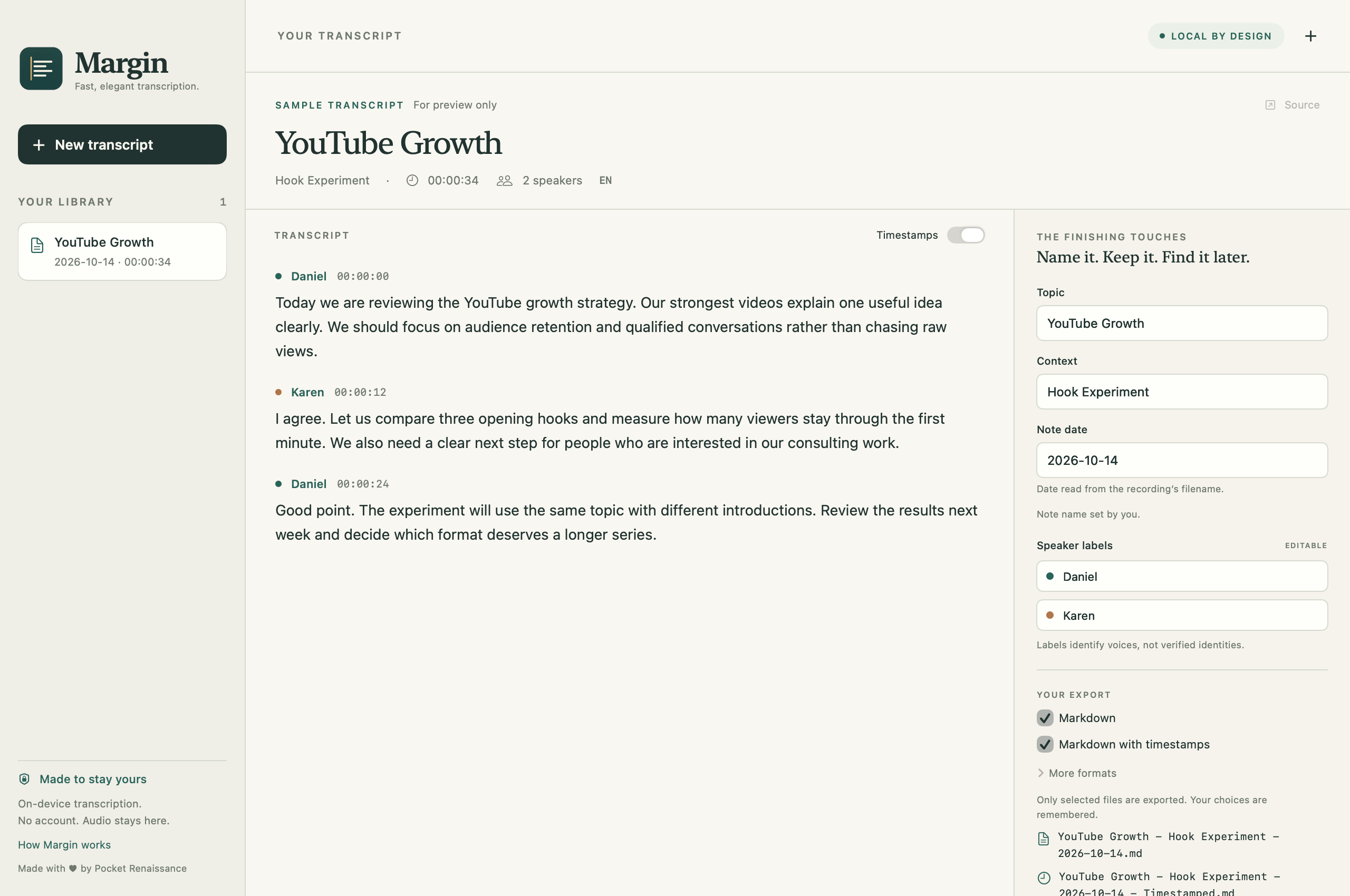
Margin groups the transcript into paragraphs and adds speaker headings when you want them. Export notes with timestamps, without timestamps, or both.
 Pocket
Margin for Apple Silicon Macs
Margin transcribes audio and video on your Mac, then turns the transcript into readable Markdown. Save it to Obsidian or take it to your favourite editor or AI tool.
Preparing for the Mac App Store.
Requires Apple Silicon (M1 or later) · macOS 14+
Intel Macs are not supported.
Design Review
Alex
Let's keep the space simple. A long table by the window, somewhere for sketches, and enough room to move things around.
Sam
I like that. We can try the layout for a week before choosing the shelves. The light will tell us where the work belongs.
Audio and video recordings
Local transcription
Optional speakers and timestamps
One-time purchase
Markdown exports
Keep a readable copy of the conversation in the folder where you already work. Margin lets you choose how much detail comes with it.
01 / READ
Margin groups the transcript into paragraphs and adds speaker headings when you want them. Export notes with timestamps, without timestamps, or both.
02 / FIND
Edit the topic, context and date. Margin uses them in a Topic - Context - Date filename, like the sample above.
03 / KEEP
Export Markdown to your Obsidian vault or another folder. You can add TXT, SRT subtitles or JSON, and Margin remembers the formats you select.
On your Mac
Transcription and optional speaker identification run on your Mac. Margin does not upload your recording or transcript, and you don't need a Margin account.
First use downloads speech models from Hugging Face. Once your chosen models are ready, you can transcribe offline. Download progress is visible, with automatic retries for temporary connection problems.
Using Margin
Drop in an audio or video file. Turn Identify speakers on for a conversation, or off for a simpler transcript.
Check names and important details against the recording, then edit the topic, context, date and speaker names before exporting.
Choose your formats and export. Open the files in Obsidian, an editor, or an AI tool of your choice.
Margin requires an Apple Silicon Mac (M1 or later) running macOS 14 or newer. It requires internet and several GB of free storage for the initial speech-model downloads. Intel Macs are not supported.
Margin creates readable transcripts of what was said. It does not generate summaries, action items or rewritten notes. You can take your exported transcript to an AI tool yourself if you want to work with it further.
Margin will cost US$19.99 at launch, with a regular price of US$29.99. Pay once through the Mac App Store, without a subscription or transcription credits. The store will show the price for your region. Recording length is limited by your Mac's memory and the selected model, up to a maximum of four hours per recording. Longer recordings may need to be split.
Yes, once your selected speech models are fully downloaded. First use, switching to a model you haven't downloaded, or restoring missing model files needs an internet connection. Hugging Face and its delivery providers receive the normal connection information needed to deliver those files.
Audio and video recordings with an audio track macOS can decode, including common WAV, MP3, M4A and MP4 files. Protected media is not supported. Margin imports existing recordings and does not record live meetings.
Speech recognition and speaker labels can make mistakes. Review important names, numbers and statements against the original recording before relying on or sharing a transcript.
Requires Apple Silicon (M1 or later) · macOS 14+
Intel Macs are not supported.